

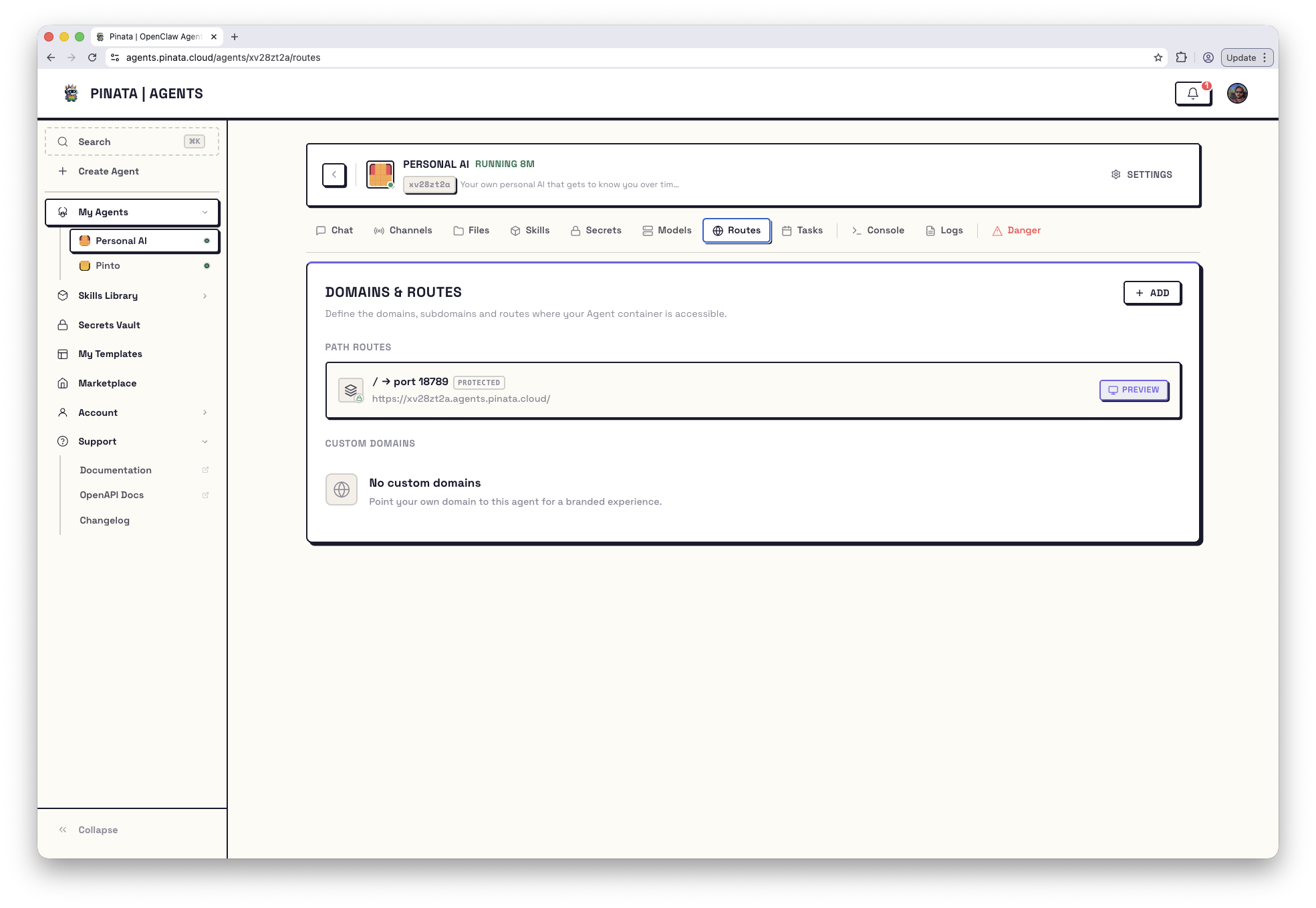
Two kinds of route
Open your agent → Routes. There are two sections:- Path routes — your service is reachable on the agent’s own subdomain, under a path prefix you choose. No DNS work; works immediately.
- Custom domains — your service is reachable on a Pinata-provided subdomain (
name-name-NN.apps.pinata.cloud) or on your own domain.
Path routes
This is the simplest option. Pick a port and a path; the route becomes available at:- Container port — the port your service is listening on inside the agent (e.g.
5173) - Path prefix — the URL path (e.g.
/app, or/for everything) - Public or Protected access — see below
/app/users/123, your service sees /users/123. Most frameworks let you configure a base path to match — for Vite that’s base: "/app".
Custom domains
Custom domains are currently in beta.
Pinata-provided subdomain
Easiest. You get a randomname-name-NN.apps.pinata.cloud subdomain that points at your agent.
- + ADD → Subdomain tab
- Optionally rename the auto-generated subdomain (you can also accept the default)
- Set the container port and Public/Protected
- Register — it’s live immediately
Bring your own domain
- + ADD → Custom Domain tab
- Type your domain (e.g.
app.example.com) - Pinata gives you a TXT record value — add it as
_pinata-verify.app.example.comat your DNS provider - Submit the registration
- Pinata gives you a CNAME target — add a CNAME from
app.example.comto that target - Click Verify
Editing a custom domain
Once registered, you can change the target port and the Protected flag. You can’t rename the domain — to switch, delete and recreate.Public vs Protected
Every route, path or domain, is one or the other.- Public — anyone on the internet can reach it. Use this if your service handles its own auth, or you genuinely want it open.
- Protected — requests must include the agent’s gateway token. The token can be in the
Authorization: Bearerheader, a?token=...query string, or agw_tokencookie. Use this when you want the route locked down with no extra work.
Building a web app that works behind a route
Two things have to be true or it won’t work, and the fix is almost always one of them:- Your server has to bind to
0.0.0.0, notlocalhost. The gateway can’t reachlocalhostfrom outside the process. - Your dev server has to allow the agent’s host. Vite, Next, etc. check
Hostand reject unknowns by default.
__AGENT_HOST__ in config files — it’s replaced at runtime with the agent’s public hostname. Example for Vite:
Limits and reserved values
- Up to 10 path routes per agent
- Up to 5 custom domains per agent
- Container ports must be between
1025and65535. Port18789is reserved for the gateway. - Subdomains containing the word “pinata” or using reserved suffixes are rejected.